Centimetre-accurate GPS for your drone
Our base station near Tbilisi sends GPS corrections over the internet. Point your ground station app at it and your drone’s position goes from a few metres of error to a few centimetres.
If this doesn’t update, open the live dashboard.
How it works
Before you start
You need all of these. If one is missing, the steps below won’t get you to RTK.
- An RTK-capable GPS on the droneFor example a module built on u-blox ZED-F9P or Unicore UM980/UM982. If its spec sheet doesn’t mention RTK, it can’t use corrections.
- A ground station app connected to the droneAircast QGC, QGroundControl 5 or Mission Planner, on a computer or tablet with internet.
- A working telemetry linkThe corrections reach the drone through it, so it must stay connected while you fly.
- A drone loginA username and password for the base station. Ask Pavlo for yours.
- Within about 20 km of the baseThe base is in Tbilisi (see on a map). Further away, accuracy drops.
- Open sky at your flying spotTrees, buildings and indoor testing stop the GPS from getting a fix.
Connect
Pick the app you use. You only do this once per ground station; the settings are saved.
Aircast QGC (or QGroundControl 5)
- Open Settings (the gear, top right) → NTRIP / RTK.
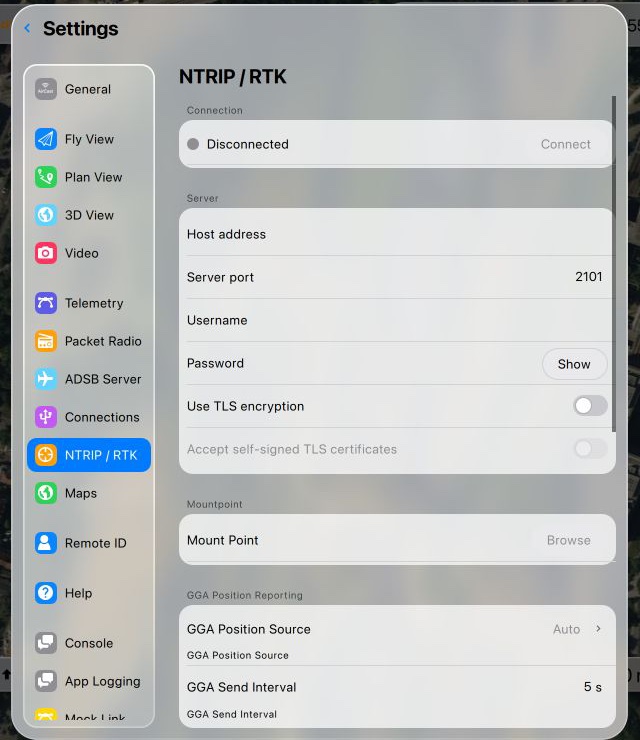
The NTRIP / RTK page before you fill it in. - Under Server, enter:
Host address ntrip.pavlokostiuk.cloudServer port 2101Username / Password Your drone login Use TLS encryption Off - Under Mountpoint, click Browse and pick GS10. Or type
GS10.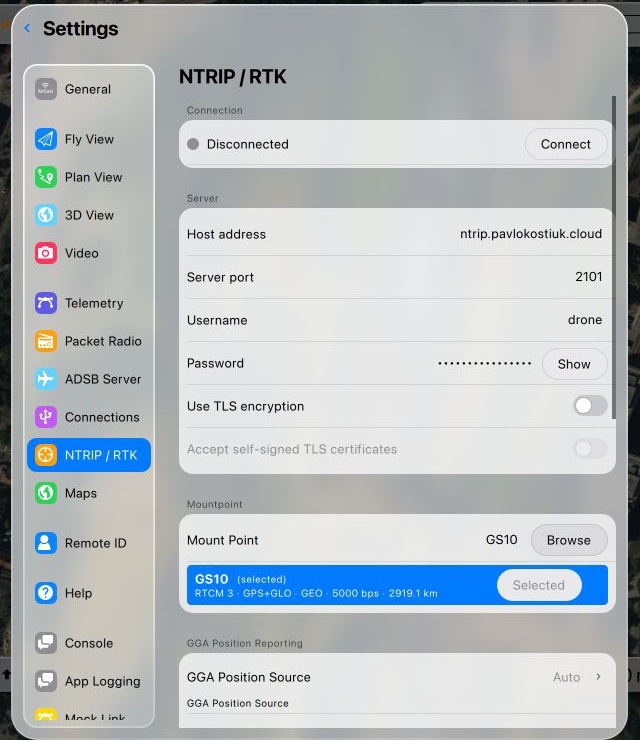
Browse lists what the server offers. GS10 is our base station. - Click Connect. The dot turns green and the message counter starts going up.
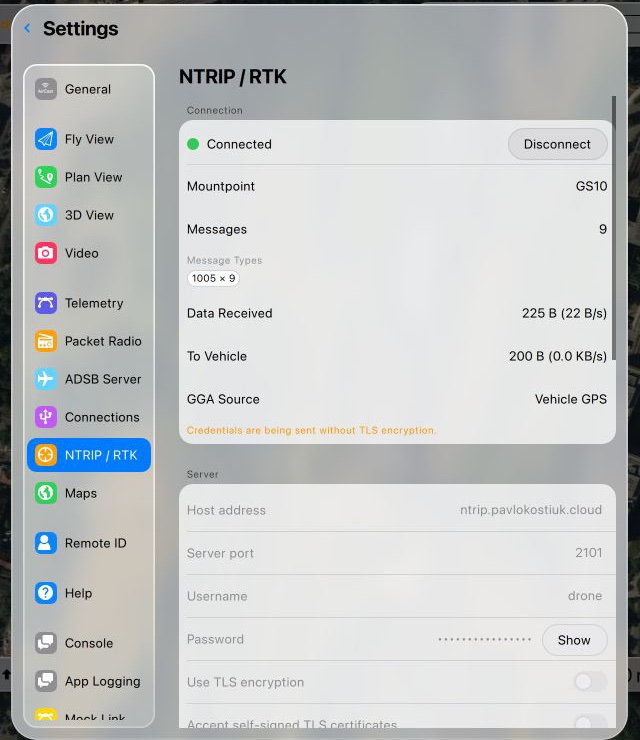
Connected. “To Vehicle” is what reached your drone. “Authentication failed (401)”: the username or password is wrong. Check it with Pavlo.
“HTTP 404: Not Found”: the base station is offline. Check the status box at the top of this page.
Orange “Credentials are being sent without TLS”: expected. You can ignore it.
Mission Planner
- Connect to the drone over telemetry.
- Go to Setup → Optional Hardware → RTK/GPS Inject.
- Choose NTRIP as the source and paste this, putting your username and password in:
http://USERNAME:PASSWORD@ntrip.pavlokostiuk.cloud:2101/GS10
- Click Connect. The RTCM message counters should start going up.
“401 Unauthorized”: the username or password is wrong.
Connects but nothing counts: the base station is offline. Check the status box at the top.
Companion computer (MAVProxy)
module load ntrip
ntrip set caster ntrip.pavlokostiuk.cloud
ntrip set port 2101
ntrip set mountpoint GS10
ntrip set username USERNAME
ntrip set password PASSWORD
ntrip start
Did it work?
You’re done when the drone’s GPS shows RTK Fixed.
In QGC, tap the satellite icon in the top bar: GPS Lock reads 3D RTK GPS Lock (fixed). In Mission Planner, the GPS status on the flight display reads RTK Fixed.
On the way there you’ll usually see RTK Float first. That means corrections are arriving and the GPS is still working out the exact position. With open sky it normally moves on to Fixed by itself; just wait.
If something goes wrong
| What you see | What to do |
|---|---|
| 401, “Authentication failed” | Wrong username or password. Check it with Pavlo. |
| 404, “Not Found”, or nothing counting | The base station is offline. See the status box at the top; nothing to fix on your side. |
| “No data received for … seconds” | The base stopped sending. The app reconnects by itself when it’s back. |
| Messages count up, but the GPS never leaves “3D Lock” | The GPS isn’t RTK-capable, or the telemetry link to the drone dropped. |
| Stuck at RTK Float | Move to open sky and check you’re within about 20 km of Tbilisi. |
Words used here
- RTK
- Real-Time Kinematic. A way of correcting GPS with a nearby base station, down to centimetres.
- Base station
- A GPS receiver that stays still at a known position and measures the error. Ours is a Leica GS10.
- Corrections (RTCM)
- The data the base sends. RTCM is the standard format GPS modules understand.
- NTRIP
- The standard way of sending corrections over the internet.
- Mountpoint
- The name of one correction stream on the server. Ours is
GS10. - Float / Fixed
- Float: corrections are arriving, decimetre-level. Fixed: centimetre-level, the goal.